

Gridshare's industry leading Virtual Power Plant (VPP) engine lets you maximize revenue for your customers and yourself while decarbonizing the grid.
Introduction
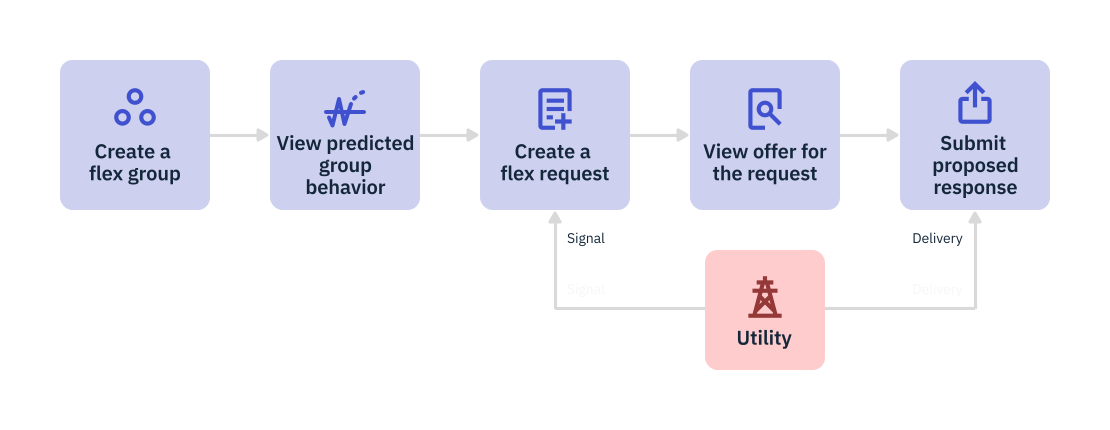
Gridshare's API makes VPP participation easy. With all of your devices on one platform, you can easily take part in VPP events by creating and sending commands to groups of devices, referred to as flex groups in Gridshare.
In Gridshare, VPP events are referred to as flex events — where a group of assets are controlled in aggregate to deliver flexible power to the grid.
VPP engine
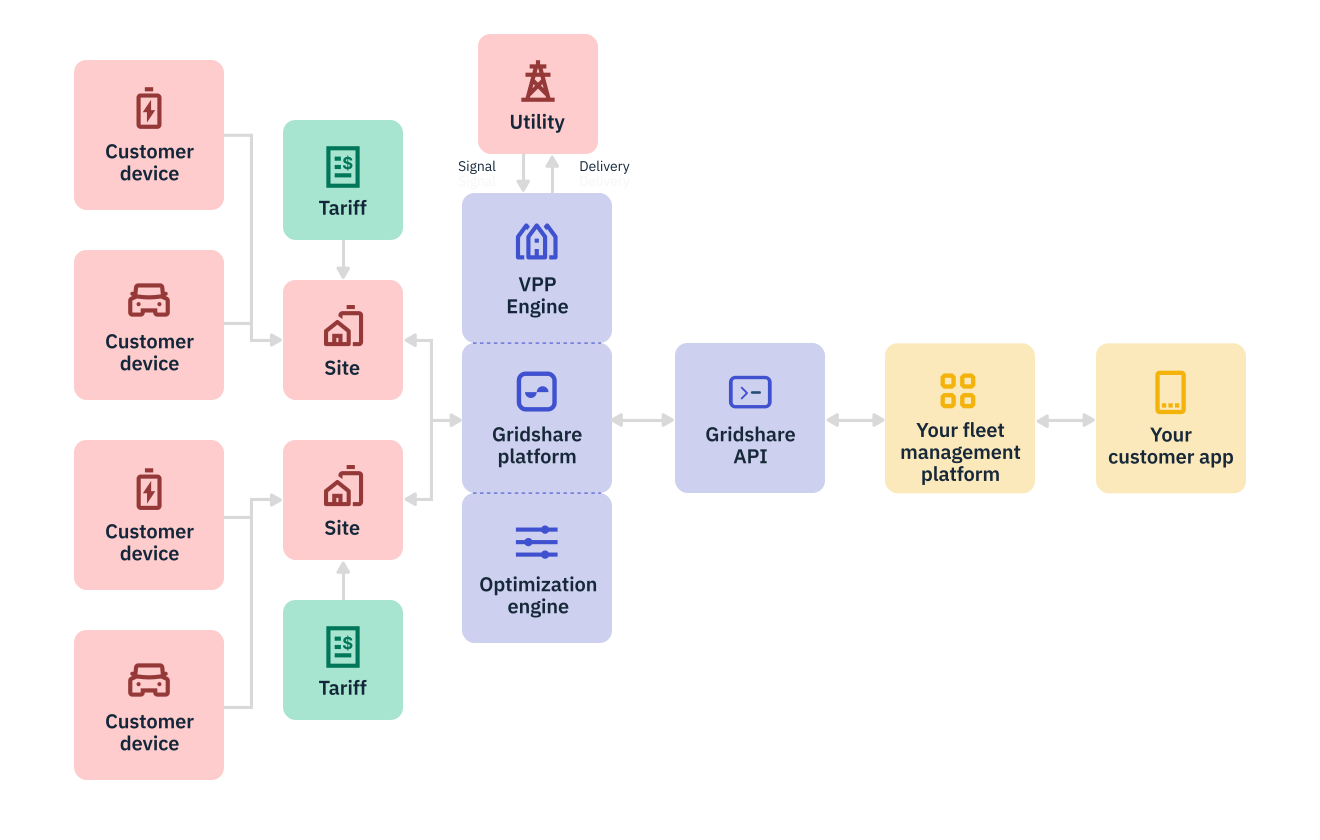
Gridshare's VPP engine estimates the behavior of a flex group (a group of devices chosen to participate in a VPP) at a given time in the future. Referred to in Gridshare as a prognosis, this estimation is created by predicting power at the settlement point for every participating device or site individually, then adding these together to provide an aggregate power forecast.
After receiving a utility signal for a VPP event, referred to as a flex request in Gridshare, Gridshare creates the optimal offer from the group. Because Gridshare is a home energy management platform as well as a VPP platform, Gridshare considers in detail the energy available from, and the cost of participation for, each site when producing an offer.
You can accept and submit the offer in two ways, with the flex cycle or the flex event section. Both allow you to send commands to the group to modify its behavior in accordance with utility needs.
The flex cycle section provides a detailed step-by-step method for users who want granular control and insight over Gridshare's VPP operation. The flex event section provides a means of automating VPP participation.
Importantly, Gridshare can co-optimize customer devices to achieve a target, such as minimizing end-customer costs, reducing carbon emissions, or minimizing wholesale procurement costs. In addition, Gridshare always considers device and site constraints that may affect VPP delivery, thereby improving customer value and satisfaction.
Create a flex group
To set up a flex group to participate in a VPP, use the Create Flex Group endpoint. This is a POST request to specify the group name, currency (for estimating cost impact), and operating timezone.
Add participants to the group
After creating the group, add participants with the Create Bulk Actions on Flex Participants endpoint. This is a POST request to add all participants into a single request. Participants can be sites, locations of DERs, inverters, or aggregates.
To add participants, enter their settlement point — that is, the location in a participant's infrastructure where power data for measurement and verification are taken. The settlement point will determine how the power generated or consumed by a flex participant is accounted for in the VPP, after any baseline calculations have been made, and the type of participant they are. The baseline calculation will be generated by considering the site’s past behavior in flex deliveries for a particular program.
Participants in a flex group are distinguished based on their settlement points. There are three primary types of participants:
- Site participants: These participants have their settlement point at their connection to the grid.
- Inverter participants: These participants have their settlement point at the AC output of the inverter.
- Aggregate participants: An aggregate is perceived as a singular unit on Gridshare, even though it encompasses multiple devices or sites. The settlement point for these participants is the aggregate's output, which is calculated by measuring the aggregated device data.
Participate in flex events with flex cycle
View estimated behavior for the group
To view the latest prognosis (the expected aggregated behavior of the flex group at a given time range) in a list of historically generated prognoses, use the List Prognosis endpoint. This is a GET request. To view a specific prognosis including the power profile, use the Get Prognosis endpoint by entering the relevant prognosis ID. This is also a GET request.
Create a flex request
In Gridshare, creating a request to participate in a flex event is referred to as requesting differentials (diffs) compared to the prognosis. By requesting a diff, you are requesting alterations to the flex group's expected power output and instructing the flex group to interact with the grid by modifying its behavior. To send a flex request to the group, request a diff on top of the prognosis by using the Create Diff Request endpoint. This is a POST request.
View the offer for the event
After you've created the flex request, Gridshare will produce the optimal group behavior for the event, taking into account the constraints of each site and the VPP's target.
If Gridshare is co-optimizing for VPP revenue and customer end costs, the request will return the opportunity cost for the event. The cost of the event represents the cost for all participants if the offer is accepted, considering the savings that would have otherwise resulted from their behind-the-meter optimization.
To monitor the status of your request and view the offer, use the Get Diff Request endpoint. This is a GET request which returns the status.
The status of the request will be ‘pending’ until the offer is ready, at which time the status will change to ‘success.' You can then view the offer, including the opportunity cost.
Submit flex event response
If you are satisfied with the flex offer produced, finalize it by calling the Create Diff Order endpoint. This is a POST request that will dispatch commands to specific participants, ensuring the desired energy behavior is achieved.
Automate VPP participation with flex events
To automate VPP participation, use the flex events section of the API. This is a high-level, automated method to skip the functional steps described above.
To create a flex event using this method, use the Create Flex Event endpoint to request a differential on top of the prognosis. This is a POST request.
Once submitted, the system will then adopt a "best effort" approach and fulfill the requested diff as closely as possible with the energy the participants have available.
This endpoint supports the creation of flat dispatch events for a given target power, which Gridshare will aim to achieve with a flat profile within the specified time frame. Or, if the goal is to discharge as much power as possible, the system will maximize the discharge based on the power available in the flex group.